SmartAuth
SmartAuth is the JWT authentication module for Dolibarr, designed for SmartMaker applications.
Why SmartAuth?
Natively, Dolibarr offers an API where each user has a single API key granting access to their whole functional scope.
This is a problem: if you develop a mobile application that should only have access to the user's agenda, the native key also lets the application reach the invoices and everything else.
Our approach
With SmartAuth, a user can have as many API keys as they want, each key with its own permissions. If a key is tied to an application, it cannot be reused by another one.
Benefits:
- Access partitioning: each application has its own key
- Targeted revocation: if a device is stolen, delete only its key
- Traceability: connection logs per device
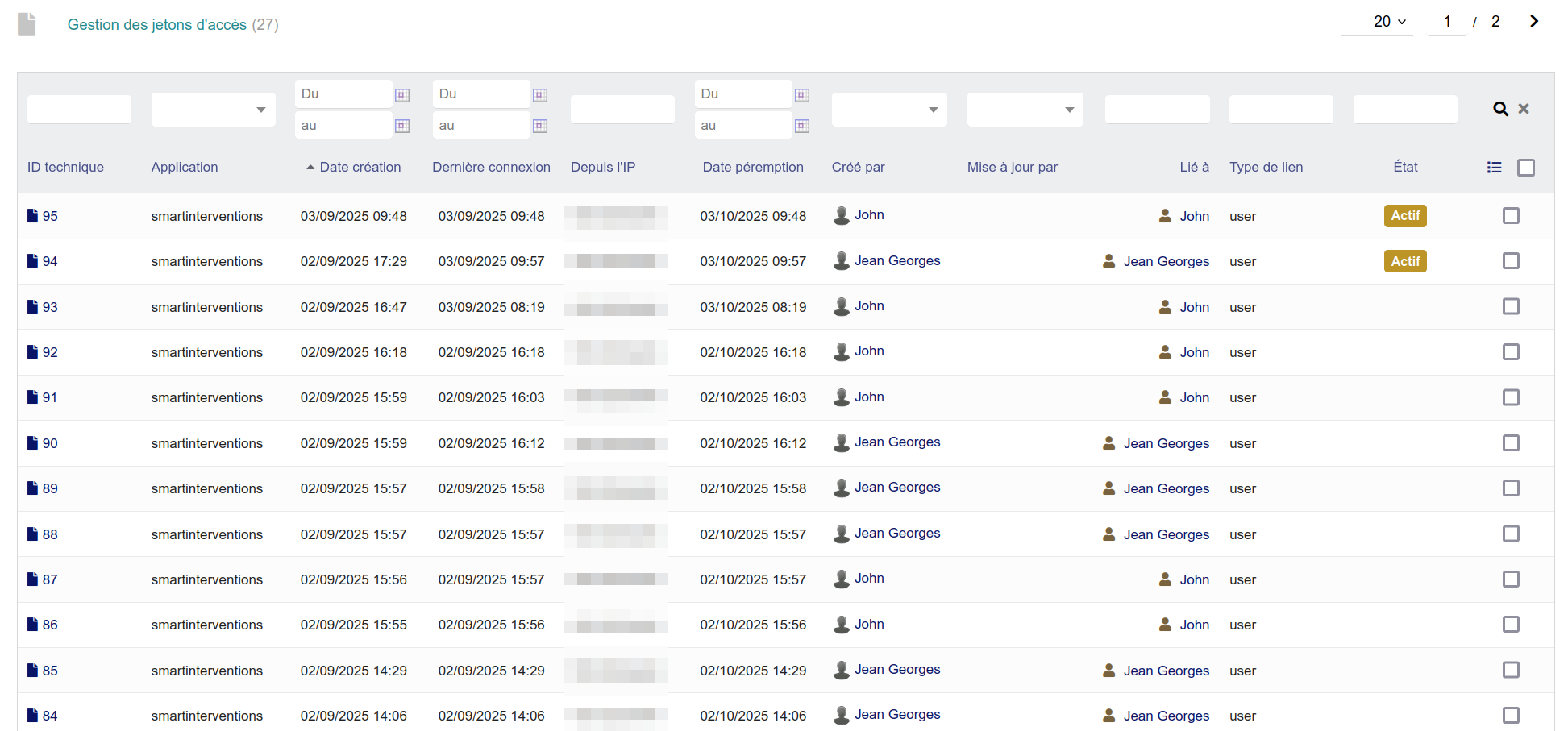
Connection logs
Open the logs to spot incorrect actions and manage the accesses:

Installation
Download SmartAuth for free on the DoliStore: https://www.dolistore.com/product.php?id=2509&l=fr
JWT authentication flow
Overall diagram
┌─────────────┐         ┌─────────────┐         ┌─────────────┐
│   Mobile    │         │   api.php   │         │  Dolibarr   │
│   (React)   │         │   (JWT)     │         │   (PHP)     │
└──────┬──────┘         └──────┬──────┘         └──────┬──────┘
       │                       │                       │
       │  1. POST /login       │                       │
       │  {login, password}    │                       │
       │──────────────────────>│                       │
       │                       │  2. Check user        │
       │                       │──────────────────────>│
       │                       │                       │
       │                       │  3. User valid        │
       │                       │<──────────────────────│
       │  4. {accessToken,     │                       │
       │      refreshToken}    │                       │
       │<──────────────────────│                       │
       │                       │                       │
       │  5. GET /items        │                       │
       │  Authorization: Bearer│                       │
       │──────────────────────>│                       │
       │                       │  6. Validate token    │
       │                       │  + load user          │
       │                       │──────────────────────>│
       │                       │                       │
       │  7. Data              │                       │
       │<──────────────────────│                       │
JWT tokens
SmartAuth uses two tokens:
| Token | Lifetime | Usage |
|---|---|---|
accessToken |
15 minutes | Authenticate the API requests |
refreshToken |
7 days | Obtain a new accessToken |
Authentication endpoints
| Method | Route | Description | Protected |
|---|---|---|---|
| GET | /login |
Fetch the connection info (logo, etc.) | No |
| POST | /login |
Authentication (login + password) | No |
| GET | /refresh |
Renew the accessToken | No |
| POST | /logout |
Sign out (invalidates the refreshToken) | Yes |
| POST | /device |
Register a device for the notifications | Yes |
| POST | /qr-pair/{pairingId}/claim |
Mobile claims a pairing displayed by the PC | No |
| POST | /qr-pair/{pairingId}/poll |
Mobile polls until the PC confirms | No |
Configuration on the api.php side
Authentication routes
<?php
require_once '../smartmaker-api-prepend.php';

use SmartAuth\Api\AuthController;
use SmartAuth\Api\RouteController as Route;

// Public routes
Route::get('login',     AuthController::class, 'index');      // Connection info
Route::post('login',    AuthController::class, 'login');      // Authentication
Route::get('refresh',   AuthController::class, 'refresh');    // Refresh token

// Protected routes
Route::post('logout',   AuthController::class, 'logout', true);  // Sign out
Route::post('device',   AuthController::class, 'device', true);  // Register device

// Your business routes...
Route::get('items', ItemController::class, 'index', true);

// Fallback
json_reply('Access denied', 403);
The smartmaker-api-prepend.php file
This file (generated by SmartBoot) contains:
- The mandatory Dolibarr headers
- The loading of the SmartAuth autoloader
- The initialization of the JWT layer
- The autoloader for your module classes
Important
Do not modify this file unless you know what you are doing.
Usage on the React side
Provider configuration
// appConfig.js
export const config = {
  api: {
    prefixUrl: import.meta.env.VITE_API_URL,
    paths: {
      login: "login",
      logout: "logout",
      refresh: "refresh",
    },
  },
};
Login with useApi (manual)
import { useApi, useGlobalStates } from '@cap-rel/smartcommon';

const LoginPage = () => {
  const api = useApi();
  const gst = useGlobalStates();

  const handleLogin = async (data) => {
    try {
      const user = await api.login(data);
      gst.local.set('session', user);
    } catch (error) {
      console.error('Login failed:', error);
    }
  };

  return (
    <form onSubmit={handleSubmit(handleLogin)}>
      {/* ... */}
    </form>
  );
};
Simplified login with LoginComponent
Rather than reinventing the form, smartcommon exposes <LoginComponent>, which wraps the complete flow: email + password + optional entity selection + smartAuth QR pair scan:
import { LoginComponent } from '@cap-rel/smartcommon';

<LoginComponent
  onSuccess={(user) => navigate("/")}
  onError={(err) => log.error(err)}
  // QR pair enabled by default. Disable it explicitly when the backend
  // does not expose /qr-pair (non-smartAuth case).
  enableQrPair
  showRememberMe
  labels={{
    emailLabel: t("login.email"),
    submitLabel: t("login.submit"),
    scanQrLabel: t("login.scan-qr"),
  }}
/>
See Advanced components -> LoginComponent for the labels, styling slots and options of the QR pair flow.
Automatic refresh
The useApi hook handles the token refresh automatically:
// When the accessToken expires, useApi:
// 1. Intercepts the 401 error
// 2. Calls GET /refresh with the refreshToken
// 3. Updates the tokens in the session
// 4. Replays the original request
Logout
const handleLogout = async () => {
  await api.private.post('logout');
  setSession(null);
  navigate('/login');
};
Device management
Registering a device
For push notifications, register the device after the login:
const registerDevice = async (pushToken) => {
  await api.private.post('device', {
    json: {
      token: pushToken,
      platform: 'android', // or 'ios', 'web'
      name: 'My phone',
    },
  });
};
Structure on the Dolibarr side
SmartAuth stores the devices in a dedicated table:
| Field | Description |
|---|---|
fk_user |
ID of the Dolibarr user |
token |
Push token of the device |
platform |
Platform (android, ios, web) |
name |
Device name |
last_used |
Date of last use |
Device identification (DeviceIdentificationComponent)
When a user signs in from a device that is not registered yet, SmartAuth can return a user.deviceOptions listing their existing devices so they can choose to pair or to create a new one.
The <DeviceIdentificationComponent> component wraps that flow:
import { DeviceIdentificationComponent } from '@cap-rel/smartcommon';

<DeviceIdentificationComponent
  onSuccess={() => navigate("/")}
  onError={(err) => toast.error(err.message)}
  labels={{ title: t("device.title"), submitLabel: t("device.submit") }}
/>
On submit, api.identifyDevice({ label, uuid }) is called. The smartAuth endpoint clears user.deviceOptions on the server side. See details.
QR pair (login by scanning)
SmartAuth lets a user sign in on mobile by scanning a QR code displayed by an already authenticated workstation, without typing a password. The mobile becomes a "trusted" device persisted locally.
Endpoints
POST /qr-pair/{pairingId}/claim   // Mobile claims the pairing
POST /qr-pair/{pairingId}/poll    // Mobile polls until confirmation
On the useApi side
useApi() exposes two matching methods:
const api = useApi();

// 1. Mobile claims a pairing_id displayed by the PC
const { claim_token } = await api.claimQrPair(pairingId, {
  device_label: "iPhone Eric",
  device_uuid: "u-1",
});

// 2. Mobile polls until the PC confirms
//    Statuses: 'pending' | 'cancelled' | 'expired' | 'consumed'
const data = await api.pollQrPair(pairingId, claim_token);
// data.status === 'consumed': user persisted automatically in local storage
When pollQrPair returns consumed, the user is persisted automatically (by design: a scanned device is trusted). There is no auth helper to call.
Built-in UX: LoginComponent
So that this flow does not have to be reimplemented in every app, <LoginComponent enableQrPair /> (enabled by default) handles scan -> claim -> poll with:
- An idempotency guard (avoids the 409 on Android with autofocus)
- A full-screen overlay with a spinner during claim/poll
- A "Cancel" button and a global timeout
- Customisable error mapping through
getQrErrorLabel
See details.
Backend reference
~/dev/smartauth/api/QrPairController.php. Error codes exposed through error.apiCode:
pairing_not_claimable/ 409: QR already usedpairing_not_found/ 404: invalid QRpairing_expired/ 410: expired QRrate_limited/ 429: too many attemptsinvalid_pairing_id/ 400: incorrect format
Security
Best practices
- HTTPS mandatory: the JWT tokens travel in clear text
- Secure storage: use
useGlobalStates, which persists in encrypted localStorage - Token rotation: the refreshToken is single use
- Revocation: delete the keys from the Dolibarr interface
If a device is stolen
- Sign in to Dolibarr
- Go to your user profile
- Delete the API key of the stolen device
- The associated tokens are invalidated immediately
Password reset
SmartAuth includes a complete token-based password reset system.
Endpoints
| Method | Route | Description | Protected |
|---|---|---|---|
| POST | /password/reset |
Reset request (sends an email) | No |
| POST | /password/confirm |
Confirmation with a token | No |
| POST | /password/change |
Password change (signed-in user) | Yes |
Requesting a reset
// React side
const requestReset = async (email) => {
  await api.public.post('password/reset', {
    json: { email }
  });
};
The server:
- Checks the user (rate limiting: 3 attempts per 15 minutes)
- Generates a token with an expiry (1 hour)
- Sends an email with the reset link
Confirming the reset
const confirmReset = async (token, newPassword) => {
  await api.public.post('password/confirm', {
    json: { token, password: newPassword }
  });
};
Changing the password (signed-in user)
const changePassword = async (oldPassword, newPassword) => {
  await api.private.post('password/change', {
    json: {
      current_password: oldPassword,
      new_password: newPassword
    }
  });
};
Temporary files (SmartTempFile)
SmartAuth provides a temporary file system for downloading binaries (Excel exports, generated PDFs, etc.).
Endpoints
| Method | Route | Description |
|---|---|---|
| GET | /temp-file/{token} |
base64 download (JSON) |
| GET | /temp-file/{token}/binary |
Binary download (stream) |
| DELETE | /temp-file/{token} |
File deletion |
Usage on the PHP side (Controller)
use SmartAuth\Api\SmartTempFile;

public function exportExcel($payload)
{
    // Generate the file
    $filePath = '/tmp/export.xlsx';
    // ... file generation ...

    // Store as a temporary file (default TTL: 1 hour)
    $tempFile = new SmartTempFile();
    $token = $tempFile->store($filePath, [
        'filename' => 'export.xlsx',
        'mimetype' => 'application/vnd.openxmlformats-officedocument.spreadsheetml.sheet',
        'user_id' => $payload['user_id'],
        'entity' => $payload['entity'],
    ]);

    return [['token' => $token], 200];
}
Usage on the React side
// Binary download
const downloadExport = async (token) => {
  const response = await api.get(`temp-file/${token}/binary`, { raw: true });
  const blob = await response.blob();

  // Create a download link
  const url = URL.createObjectURL(blob);
  const a = document.createElement('a');
  a.href = url;
  a.download = 'export.xlsx';
  a.click();
  URL.revokeObjectURL(url);
};
CORS
SmartAuth handles the CORS headers for cross-origin requests automatically.
Configuration
| Dolibarr constant | Description | Default |
|---|---|---|
SMARTAUTH_CORS_ORIGIN |
Allowed origin | * |
SMARTAUTH_CORS_METHODS |
Allowed methods | GET, POST, PUT, DELETE, PATCH, OPTIONS |
SMARTAUTH_CORS_HEADERS |
Allowed headers | Content-Type, Authorization, X-DeviceId |
The OPTIONS (preflight) requests are handled automatically.
Important
In production, set SMARTAUTH_CORS_ORIGIN to the exact URL of your application instead of *.
Trusted proxies
If your Dolibarr sits behind a reverse proxy (nginx, Apache, etc.), configure the trusted IPs so that SmartAuth detects the client IP address correctly:
| Constant | Description |
|---|---|
SMARTAUTH_TRUSTED_PROXIES |
Comma-separated list of IPs (e.g. 10.0.0.1,192.168.1.100) |
Private IPs (127.x, 10.x, 172.16-31.x, 192.168.x) are automatically treated as trusted proxies.
Local routes (LocalRoutes)
SmartAuth defines local routes that are loaded automatically. They do not need to be declared in your api.php:
| Group | Routes |
|---|---|
| Auth | /login, /refresh, /logout, /device |
| Password | /password/reset, /password/confirm, /password/change |
| Files | /file/{hash}, /file/{hash}/binary |
| Temporary files | /temp-file/{token}, /temp-file/{token}/binary |
| Synchronization | /sync/objects, /sync/register, /sync/pull, /sync/push, /sync/status, /sync/conflicts, /sync/conflicts/{id}/resolve |
| Health | /health: public, 204 without body on GET and HEAD, no database access nor log (useOnlineStatus probe) |
| PWA | /manifest, /icon/{size} |
See also
- Back (PHP) - Routes and Controllers
- API requests - Using useApi
- Configuration - Provider configuration
- SmartAuth repository: https://inligit.fr/cap-rel/dolibarr/plugin-smartauth/